If you already applied, you are already late
Stop letting applications die in your inbox.
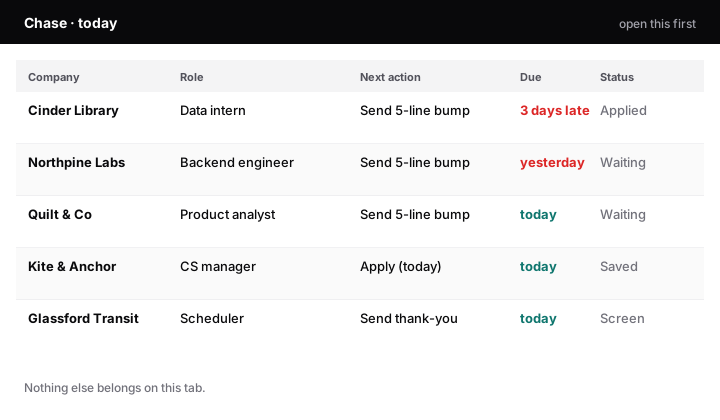
You sent the resume. Then you waited. Recruiters forget silent candidates. Who to Chase is a clipboard that only shows who you owe a follow-up today, so the next bump actually goes out.
Huntr Pro is $40 every month. This is CA$17 once. You keep the files. No account. No subscription.
Pretty logs do not chase.
A decorated tracker is still a graveyard if it never tells you who is due this morning.
Gmail is not a pipeline.
Follow-ups rot under threads. Day 5 becomes day 19. The role moves on without you.
Every quiet day trains them to forget you.
The bump you skip tonight is already late tomorrow. Open Chase before you send another application.
Pay once. Stop paying rent on a job search.
If you are in a 15 to 80 application stretch, a monthly tracker is a tax on being unemployed. This is a file you own.
Huntr / Teal
$40 / month
About $480 a year if the search drags. Features you will not open. Cancel-by-email energy.
Who to Chase
CA$17 once
Workbook + three short PDFs. Instant zip. You duplicate it into Sheets, Excel, or Numbers and keep it.
Checkout is CA$17 on Stripe, in Canadian dollars. GST/QST is not added while the seller is a small supplier.
Who this is for
Career-switchers, laid-off ICs, and new grads who already have applications in flight and will not pay SaaS rent to remember a follow-up.
|
Pretty spreadsheet |
Huntr / Teal |
Who to Chase |
| Price |
Free, then abandoned |
$40 / month |
CA$17 once |
| First screen |
Every row you ever logged |
A dashboard |
Only who is due today |
| Follow-up cadence |
You invent it |
Buried |
Day 0 / 5 / 12, with skeletons |
| Interview notes |
A blank cell |
Another tab you skip |
One printed round sheet |
What lands in the zip
Open Chase first. Everything else is there so you do not stall on setup.
WhoToChase_JobPipeline.xlsx
Duplicate into Google Sheets (recommended), Excel 365, or Apple Numbers. Tabs: Chase, Pulse, Roles, Rounds, Offer Split, Setup.
START_HERE.pdf
Ten-minute setup, then an eight-minute weekday ritual. US Letter and A4.
Chase_Cadence.pdf
Day 0 / Day 5 / Day 12, and three short skeletons you rewrite so they sound like you, not a template bot.
Round_Sheet.pdf
One page for the call: four questions they asked, two answers to reuse, one follow-up you owe.
Chase is a live list of roles whose next-action date is today or earlier and whose status is still alive. Pulse is four counts plus a response rate and an overdue number. Offer Split is side-by-side notes (base, PTO, remote, commute, gut 1–5), not a budget. Sample companies are fiction. Delete them when yours exist.
From pay to chase in one sitting
Do not send another application until the last one has a date.
01 · two minutes
Pay on Stripe
Email required. Card on Stripe. You are redirected to an unlisted download page. Receipt by email if the redirect fails.
02 · ten minutes
Open START_HERE
Duplicate the workbook. Paste the roles you already applied to. Set the next action. That is the product.
03 · today
Send the late bumps
Chase only shows who is due. Use the cadence PDF. Rewrite the skeleton. Hit send before you browse another posting.
Not this, if
Not a resume writer. Not an ATS. Not legal advice. Not a career-coaching retainer. Not a board you will decorate and abandon. If you have two applications and a notebook, you do not need this. If you want a guru course, this will annoy you.
FAQ
Do I need Google Sheets?
No. Upload the .xlsx to Drive and open it in Sheets if you want the FILTER on Chase to spill automatically. Excel 365 does the same. Apple Numbers: open the .xlsx, and if Chase errors, filter Roles on column O (On chase?) to YES. That filtered list is Chase.
Is this a subscription?
No. CA$17 once. You keep the files. Updates are not promised.
What if I already have a tracker?
Keep it if it tells you who is due this morning. If it is a pretty log of everything you ever applied to, copy the live roles into Who to Chase and start dating the next action. That is the gap.
Refunds?
14 days if you have not used it. Email the support address on the Stripe receipt. Unused file, 14 days, no argument. After that, no refund except where the law requires one. Empty or broken zip: replacement copy of the same kit.
Can I share the zip?
Personal use. No resale, no “resource pack,” no public template upload. If the download URL leaks, that is a known risk of a $17 file; the license is still personal.
The bump you skip tonight is late tomorrow.
You already spent the hours applying. Do not let the follow-up rot. CA$17, one sitting, Chase tab open today.
Made by Boris Legkow in Québec. Informational product. Not a coaching retainer.
Who to Chase · CA$17 once
Instant zip. 14-day unused refund.
Buy now